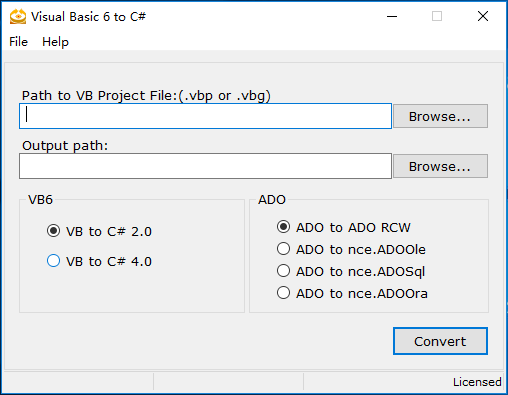
After you install VB6TOCS, a shortcut of VB6TOCS has been placed on Desktop. You can double click it to run VB6TOCS.
The following picture shows VB6TOCS window.
The options on above window are described below:
| Options | Description |
VB to C# 2.0 | Convert VB6 to C# 2.0 |
VB to C# 4.0 | Convert VB6 to C# 4.0 |
ADO to ADO RCW | If you mark this option, VB6TOCS will convert the original ADO to a .NET assembly (RCW), and continue to use ADODB in C#.NET codes. |
ADO to nce.ADOOle | Migrate from ADODB to nceADO using OLEDB.NET Data Provider. Please change the connection string of database according to OLEDB.NET Data Provider, following is the connection string sample: MS-Access : "Provider=Microsoft.Jet.OLEDB.4.0; Data Source=d:\test\test.mdb;" SQL Server: "Provider=SQLOLEDB;Data Source=MySQLServer;Initial Catalog=Northwind;User Id=sa;Password=;" |
ADO to nce.ADOSql | Migrate from ADODB to nceADO using SQL Server.NET Data Provider. Please change the connection string of the database as following: "Data Source=MySQLServer;Initial Catalog=Northwind;User Id=user1;Password=pwd1;" |
ADO to nce.ADOOra | Migrate from ADODB to nceADO using the .NET Framework Data Provider for Oracle. Please change the connection string of the database as following: "Data Source=MyOracleServer;User Id=user1;Password=pwd1;" |
A. Please input the full path of your Visual Basic 6.0 project file(.vbp) in TextBox.
B. Please input a destination path for placing the C# files generated by VB6TOCS.
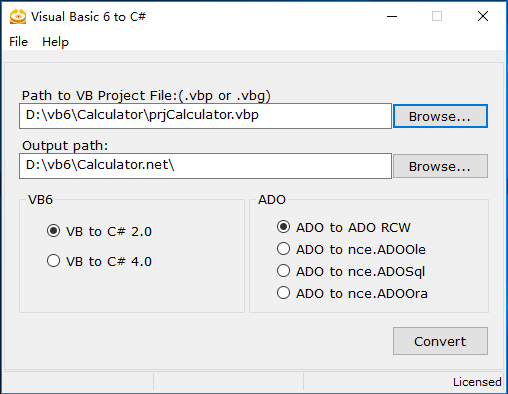
C. Click the 'Convert' button to convert your VB6 to C#.
After you click on the 'Convert' button, the following Window will be pop-uped on screen:

After the conversion completed, the migration report will be showed on the screen
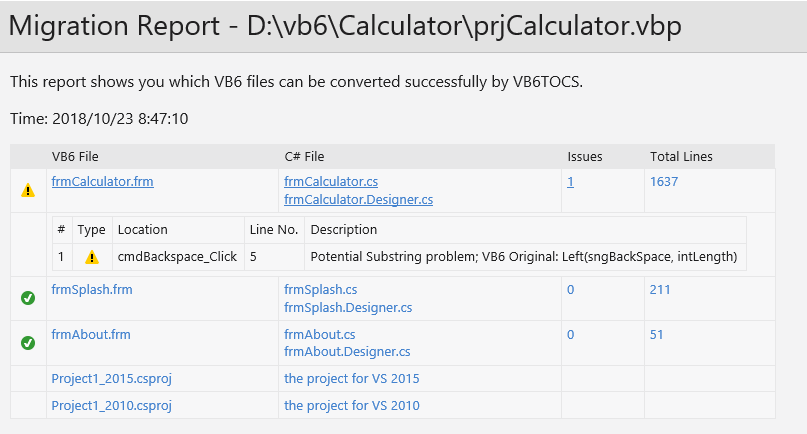
Then you could open the new C# project(.csproj) file with Microsoft Visual Studio .NET to build and modify the new source code.